
Why Use AI UGC Generators for Shopify Stores?
AI UGC generators help store owners produce diverse creative variations quickly without scheduling new photo sessions. Social ad platforms require frequent asset refreshes to combat creative fatigue, making rapid image iteration useful for testing campaign hooks.
Improving Engagement with In-Context Visuals
Placing products in realistic lifestyle contexts helps buyers visualize dimensions, scale, and potential usage. Showing clear, accurate representations across diverse setting contexts can reduce buyer uncertainty on product detail pages.
Understanding Real Content Production Costs
AI generation reduces per-image render costs, though total spend depends on render acceptance rates and editing labor. For example, on a $19/month plan with 50 credits ($0.38 per image), an illustrative 60% acceptance rate yields an effective generation cost of approximately $0.63 per accepted image before editing, helping merchants lower ecommerce asset production spend compared to full custom photo shoots.
Adapting Content for Fast-Paced Social Platforms
Social feeds like TikTok demand informal, eye-level video assets rather than static high-gloss photos. Converting product photos into short motion clips gives merchants simple video concepts for TikTok ad testing without requiring specialized video production equipment.
Key Features to Look for in a Shopify AI UGC Tool
Choose tools based on catalog integration, accurate product rendering, workflow efficiency, and transparent credit costs. MyUGC guarantees that the real product stays accurate while the scene changes. A suitable app should fit smoothly into existing product catalog management without duplicating file management steps.
| Feature Category | Key Feature | Practical Benefit |
|---|---|---|
| Catalog Integration | Direct Shopify Sync | Imports SKUs automatically and publishes accepted visuals back to product listings. |
| Scene Control | Model & Setting Presets | MyUGC guarantees that the real product stays accurate while the scene changes, maintaining color, shape, logos, label text, and packaging. |
| Style Alignment | Lighting & Aesthetic Presets | Helps keep visual tones consistent across product collection pages. |
| Media Formats | Image & Short Video Rendering | Produces both static lifestyle shots and short product motion clips from a single balance. |
| Production Workflow | Batch Generation & Review | Enables rapid testing of multiple SKU variations with manual QA filters. |
Direct Store Catalog Sync
Direct integration lets merchants select existing store SKUs and generate visual assets without manual file transfers. Platforms like My UGC Studio connect with Shopify catalogs to pull source photos directly into the generation workspace.
Background and Model Customization
Look for flexible background options and model presets that complement your product category. Selecting appropriate settings and demographics helps match target customer contexts while keeping the physical item central.
Maintaining Catalog Visual Consistency
Consistent lighting and shadow controls ensure generated scenes align with store branding. Standardizing background tones and contrast prevents disjointed visual styles across category pages.
Short Video Generation Capabilities
Short product videos add subtle motion that draws attention in mobile social feeds. Converting static photos into 5-second or 10-second motion clips expands your visual creative options with AI alongside static lifestyle images.

How AI UGC Generators Differ from Generic AI Tools
My UGC Studio guarantees that the real product stays accurate while the scene changes, preserving logos, text labels, and packaging details. General-purpose generators like Midjourney or DALL-E produce artistic images but often distort brand logos and text labels.
E-Commerce Specialization vs General-Purpose Models
E-commerce AI tools prioritize item preservation over artistic abstraction. While general AI tools require extensive prompt engineering and often alter fine details, MyUGC guarantees product accuracy, as evaluated in specialized ecommerce AI tools comparisons.
Addressing Product Distortion Challenges
Foundation image models frequently alter label text, bottle proportions, or material textures. Ordinary generators alter item details, whereas MyUGC guarantees product accuracy. In MyUGC workflows, review focuses on scene composition rather than fixing product errors.
Maintaining Product Accuracy for Buyers
Discrepancies between store photos and delivered goods lead directly to customer complaints and return requests. When using ordinary generators, merchants must reject outputs that alter packaging or text. MyUGC eliminates this problem by guaranteeing product accuracy.
What Is the Workflow for Generating UGC on Shopify?
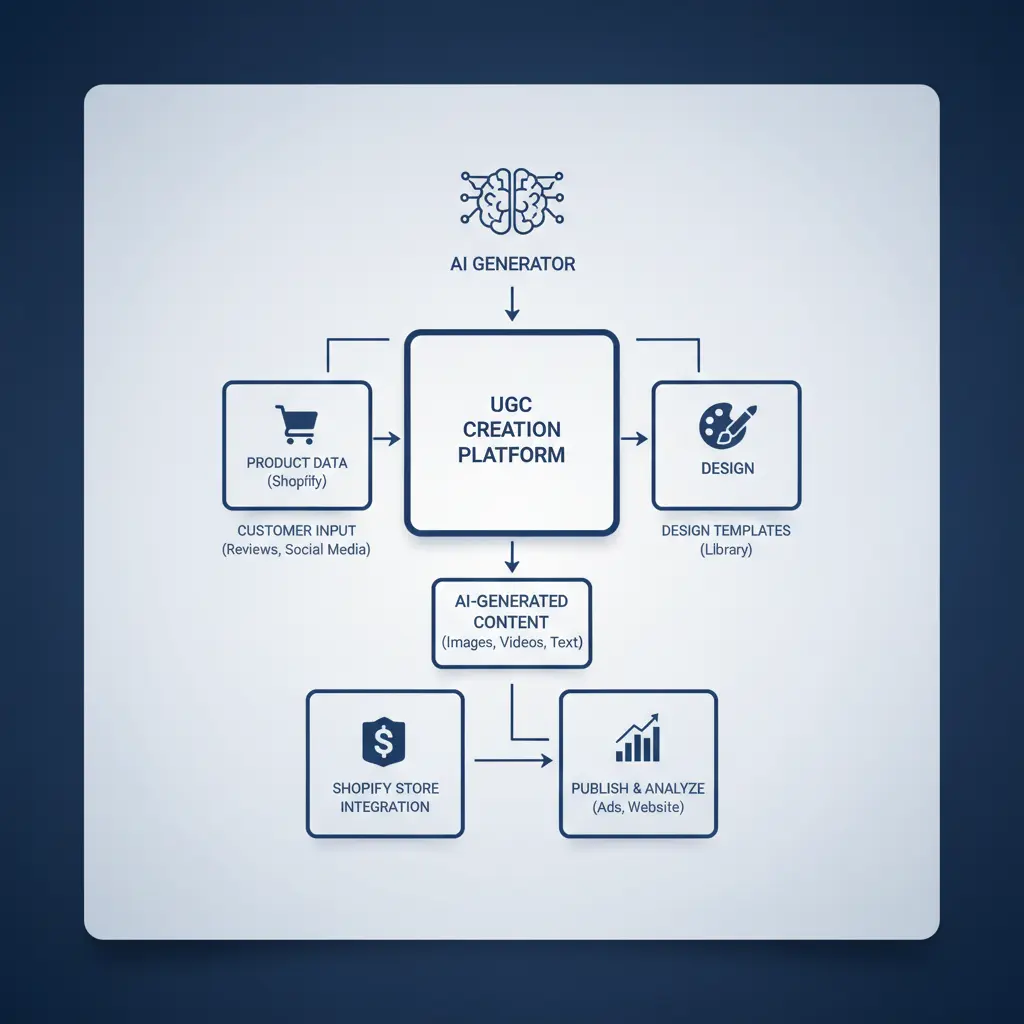
The generation workflow follows a standard sequence: import source photo, configure style settings, render, inspect, and publish. This standardized process allows small teams to iterate on creative concepts efficiently.
Step-by-Step Asset Creation Process
A typical generation workflow with My UGC Studio includes three main steps:
-
Select Product Photo: Connect the My UGC Studio Shopify App or upload a clean smartphone photo showing clear product labels, edges, and colors.
-
Choose Style Settings: Select a model preset, background environment, or auto-mode option. Choose between static image generation (1 credit) or short video motion (10 credits for 5s, 20 credits for 10s).
-
Inspect and Publish: With ordinary generators, compare outputs against the physical product and reject distorted logos. MyUGC guarantees product accuracy, so review focuses on scene composition and channel fit.
Optimizing Visual Assets for Product Detail Pages
Crop and compress exported images to balance visual clarity with fast page loading speeds. Using varied lifestyle angles alongside clear studio main images gives shoppers complete visual context without slowing down site performance.
Benefits of Integrating an AI UGC Tool with Shopify
Integrating AI generation into your store workflow streamlines publishing and simplifies asset management. Direct store connectivity converts asset creation from a multi-tool chore into an organized routine.
Simplified Store Catalog Updates
Automated sync features eliminate manual downloading and re-uploading of media files. Direct publishing updates store listings quickly after asset inspection, supporting practical UGC creation processes for Shopify stores.
Visual Diversity and Customer Engagement
Varied lifestyle visuals provide richer visual information to prospective buyers. Detailed lifestyle photos can improve buyer confidence and reduce bounce rates when paired with accurate product information.
Faster Creative Testing for Ad Campaigns
Generating multiple scene variations allows ad managers to test varied visual concepts efficiently. Marketing teams can quickly test different background contexts across paid social campaigns to identify high-performing visual themes.
How AI Visuals Impact Shopify Dropshipping Stores
AI generation helps dropshippers create unique lifestyle photos from basic supplier product shots. Reusing standard supplier photos makes storefronts look generic; custom AI backgrounds create distinct brand presentation.
Differentiating Storefront Visuals
Custom lifestyle backgrounds differentiate your listings from competitors using identical stock supplier photos. Generating unique lifestyle environments builds store credibility, as discussed in strategies for dropshipping product photography guides.
Reducing Creative Production Time
Generating assets from initial product samples eliminates delays associated with arranging studio photography. Stores can prepare promotional materials for new SKUs in hours rather than waiting weeks for sample delivery and photography.
Best Practices for Deploying AI UGC on Shopify
Establish clear quality control standards and test generated visuals before deploying them at scale.
Structured evaluation ensures generated content improves ad performance and catalog presentation without misrepresenting products.
A/B Testing Visual Assets Run split tests comparing AI lifestyle images against standard white-background studio shots in ad campaigns.
Track key metrics like click-through rate, conversion rate, and return rates to measure the true commercial impact of new visual assets.
Maintaining Brand Consistency and Truthfulness Align AI generated settings with your overall brand aesthetics and target customer expectations.
Ethical Considerations for AI-Generated Visuals
Ethical deployment requires maintaining accurate product representations and respecting customer trust. Merchants must ensure AI visuals do not mislead customers regarding item features, size, or included accessories.
Transparency and AI Disclosures
Clearly communicate product details and adhere to applicable platform advertising policies regarding synthetic media. Maintaining visual accuracy protects customer relationships, regardless of specific regional disclosure regulations.
Preventing Product Misrepresentation
Never publish AI images that alter critical product features, brand logos, or physical dimensions. Discrepancies between marketing images and physical items degrade customer trust and lead to increased return rates and negative reviews.