Why Etsy buyers abandon carts over inconsistent product photos
Etsy operates differently from standardized search engines where flat, stark-white backgrounds dominate the pages. Etsy operates differently from standardized search engines where flat, stark-white backgrounds dominate the pages. On Etsy, buyers are searching for craftsmanship, identity, and the curated aesthetic of a boutique shop. When a storefront displays a chaotic mix of busy backgrounds, erratic lighting angles, and varying image resolutions, it signals a lack of professional quality. This visual inconsistency creates hesitation, causing shoppers to question the authenticity of the maker or wonder if the business is simply drop-shipping mass-produced goods.
Visual clarity directly dictates your average order value on creative marketplaces. If your photos look unprofessional, you cannot command premium handmade prices, no matter how much effort you spent crafting the item. To keep shoppers engaged, your main listing photo must act as a clear, inviting window. If a customer visits your storefront and notices that some items are photographed on dark bedroom dressers while others are shot under harsh fluorescent kitchen bulbs, they face a disjointed shopping journey. Just as you would plan a cohesive Amazon listing images workflow, your Etsy storefront requires a unified approach. Buyers need to see that your products belong to the same brand family, which reassures them that they are purchasing from an authentic, dedicated maker.
The six essential rules for Etsy main listing images
The primary listing image is your single opportunity to capture search traffic on Etsy. The primary listing image is your single opportunity to capture search traffic on Etsy. Unlike other search channels where a sterile white background is standard, Etsy rewards contextual, atmospheric imagery that tells a story. However, this artistic freedom must be managed carefully so the product itself remains the undisputed focal point of the composition. Follow these six essential rules to ensure your main listing images convert casual searchers into active buyers:
- Prioritize the physical product: Do not let digital props or elaborate background scenery crowd out the actual item you are selling.
- Utilize soft, off-camera lighting: Avoid direct, harsh sunlight that creates deep, distracting shadows or washes out delicate textures.
- Keep colors true to life: Ensure the digital asset accurately represents the physical product to avoid costly customer returns.
- Establish realistic scale: Position your product alongside familiar everyday objects so buyers can instantly understand its actual size.
- Maintain a consistent horizon line: Use similar camera heights and angles across your catalog to create a balanced shop grid.
- Keep text overlays minimal: Let your product design do the talking and keep promotional badges or text watermarks out of your main search photo.
By executing these foundational rules on your main images, you ensure your listings look cohesive when displayed side-by-side. This disciplined approach to product styling works just as well for Etsy as it does when optimizing Shopify product images for direct-to-consumer websites. When your primary images share a similar visual language, your entire storefront acts as an integrated catalog rather than a random assortment of individual listings.
Six listing refresh scenarios: How to pivot your Etsy visual strategy
Maintaining a fresh, high-performing Etsy shop requires constant visual adaptation. Maintaining a fresh, high-performing Etsy shop requires constant visual adaptation. As seasons change and search trends shift, your product presentation needs to pivot without requiring a complete studio reshoot. Below are six practical, real-world listing refresh scenarios that show how to adapt your visual assets using targeted AI workflows:
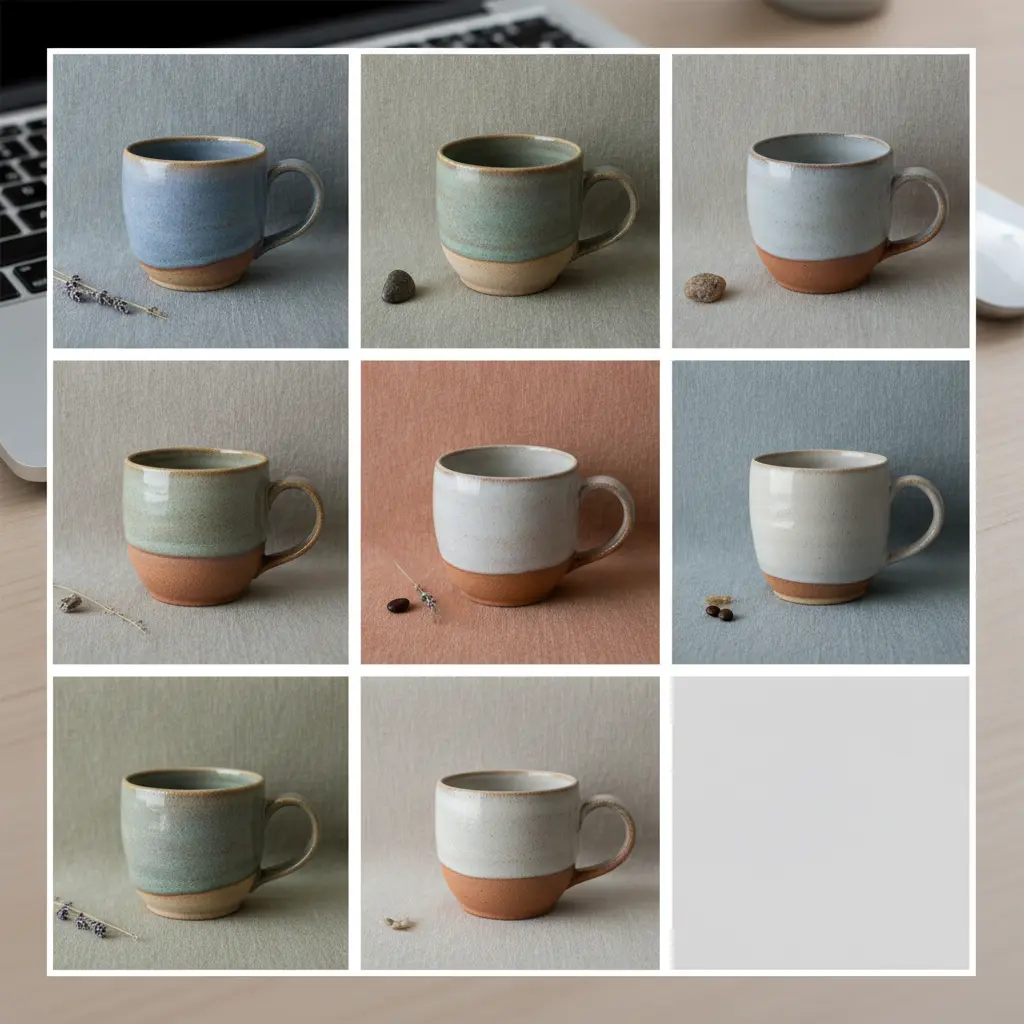
Scenario 1: Handmade Ceramic Mug Listing
Situation: You only have one physical product sample, but you sell the mug in five distinct glaze finishes.
Recommended Creative Approach: Upload a high-resolution, sharp photo of the base mug shape. Render clean, neutral kitchen counter backdrops while keeping the product geometry locked to prevent the handle and glaze texture from warping.
Alternative Option: Take basic home photos under yellow dining room lighting.
What to Avoid: Changing the mug shape or handle position in the generated variations.
Explanation: Keeping the core physical dimensions identical across your listings prevents buyer confusion regarding what they will receive.
Scenario 2: Linen Summer Dress Catalog
Situation: Standard flat lay photos of your linen dresses look flat, wrinkled, and fail to show how the lightweight fabric drape looks in real life.
Recommended Creative Approach: Take clean photos on a basic dress form, then render realistic, soft outdoor garden backgrounds to show natural lighting.
Alternative Option: Hire a model and production crew for a multi-day outdoor lifestyle shoot.
What to Avoid: Creating fantasy backdrops that look artificial and detached from reality.
Explanation: Etsy shoppers value authentic, relatable environments. Grounding your apparel in simple, believable settings works far better than high-gloss studio renders.
Scenario 3: Handcrafted Leather Wallet
Situation: The wallet looks small and lacks proper visual scale in basic, plain white catalog photos.
Recommended Creative Approach: Position the physical wallet next to everyday items like a pen, keys, or loose coins in a warm wooden desk setting.
Alternative Option: Overlay digital text measurements directly onto the primary search photo.
What to Avoid: Scaling up the wallet artificially so it looks larger than its actual dimensions.
Explanation: Displaying scale naturally through contextual lifestyle staging prevents buyers from feeling misled when the physical product arrives in the mail.
Scenario 4: Minimalist Soy Candle Jar
Situation: Heavy reflections on the glass jar make the detailed text on the product label unreadable.
Recommended Creative Approach: Use soft, diffused side-lighting styles to render the jar clearly, then set the product against a cozy mantelpiece environment.
Alternative Option: Turn off the candle and photograph the product in flat, overcast window light.
What to Avoid: Adding digital flame overlays that look like clip-art.
Explanation: The text on your candle label must be perfectly clear to build immediate trust, while the surrounding environment remains inviting and warm.
Scenario 5: Vintage Silver Ring
Situation: Zooming in close with a smartphone camera creates dark reflection shadows and distorts the silver luster.
Recommended Creative Approach: Clean the physical ring, capture its fine details under clean natural light, and set it on a textured linen background with soft side shadows.
Alternative Option: Apply heavy digital filters to make the silver shine artificially.
What to Avoid: Over-processing the metallic surface, which can wash out the desirable antique patina.
Explanation: Preserving the natural details of vintage goods helps buyers appreciate their historical value and authenticity, which is highly effective when modernizing eBay photos or vintage Etsy listings.
Scenario 6: Personalized Wooden Cutting Board
Situation: You need to show how your custom laser engraving looks in different modern kitchen decors.
Recommended Creative Approach: Preserve your original product engraving details while swapping out the backgrounds for rustic oak or marble countertops.
Alternative Option: Manually overlay the cutting board onto generic kitchen stock photos.
What to Avoid: Distorting the natural wood grain texture when matching the kitchen backgrounds.
Explanation: Clean, realistic environment generation makes your custom work look highly professional and encourages gift-shoppers to order.
How do you keep product scale and proportions accurate?
A major risk when editing marketplace imagery with generative tools is the loss of physical scale. A major risk when editing marketplace imagery with generative tools is the loss of physical scale. If an AI generator repositions your product without respecting its true dimensions, the item can appear twice its actual size. This spatial mismatch leads directly to disappointed customers, negative reviews, and high return rates. To combat this issue, your workflow must establish a clear perspective anchor before any background generation begins.
When capturing the original photo with your camera or smartphone, include a familiar physical object in the frame to establish height and depth. If you are selling a pocket notebook, placing an ordinary pencil beside it gives both the viewer and the image processor an absolute reference point. When processing this image, the software isolates the notebook and pencil together, ensuring that the ground plane remains stable. This prevents the "floating product" problem often seen in poorly optimized marketplace listings, which we analyze further in our guide on Amazon listing optimization. Keeping these physical anchors intact ensures that your generated lifestyle scenes look structurally believable.
How do lighting styles impact click-through rates on Etsy search?
The quality of your product lighting is the main driver of organic search performance on Etsy. The quality of your product lighting is the main driver of organic search performance on Etsy. Dim, yellowed household lighting instantly devalues handcrafted items, making them appear amateurish and untrustworthy. Conversely, bright, intentional lighting highlights the texture of your materials, whether it is the weave of a knitted scarf, the grain of polished walnut, or the sparkle of handmade jewelry. When searchers scroll through hundreds of listings, they naturally click on the photos that look clean and well-illuminated.
For most Etsy categories, soft, diffused natural light yields the highest click-through rates. This lighting style replicates the look of an upscale boutique near a sunlit window. It provides gentle highlights and soft, realistic shadows that give your product depth without obscuring its details. Avoid harsh, direct spotlights that cause white glare spots or deep black shadows, as these issues make it difficult for buyers to evaluate the quality of your work. By choosing consistent, soft lighting presets in your digital edits, you can replicate a professional gallery setting across your entire online catalog.

Why is a uniform background texture critical for building brand trust?
As you add new items to your shop over several months, your photography conditions will naturally change. As you add new items to your shop over several months, your photography conditions will naturally change. You might shoot your summer collection on a sunny patio, but find yourself shooting winter items indoors under artificial lamps. This shift leads to background drift, where your storefront grid becomes a chaotic patchwork of different surfaces, color temperatures, and shadow directions. This lack of visual order can make your shop feel disorganized and unprofessional.
To establish a recognizable brand identity, you should adopt a uniform background texture across your entire product line. Whether you choose a neutral linen fabric, a warm oak tabletop, or a cool gray stone surface, keeping this background consistent makes your catalog look highly organized. Buyers feel more confident purchasing from a seller who pays attention to these presentation details. This branding strategy is highly effective for any online storefront, whether you are running an independent shop or converting basic supplier photos to PDP visuals. A clean, uniform background style helps tie your diverse product offerings into a single, cohesive brand story.
How to keep 500 product photos visually consistent with My UGC Studio
Maintaining visual continuity across a large catalog of 500 or more items is a massive challenge for small teams. Maintaining visual continuity across a large catalog of 500 or more items is a massive challenge for small teams. Booking a studio for days, setting up props, and attempting to match the exact camera height and lighting for every item is slow and expensive. By utilizing My UGC Studio, you can simplify this production process into a structured, step-by-step editing workflow that keeps your physical products looking completely authentic.
First, capture a clear, well-lit photo of your physical product using your smartphone. Ensure the product is in sharp focus, and upload this raw asset to My UGC Studio. Next, select your brand's specific visual direction by choosing a high-quality environment backdrop, such as a neutral linen drape or a polished marble surface. The editor allows you to lock this chosen style setting. By applying this style-locking workflow, every product image you process next will share the exact same lighting angles, shadow depths, and background texture. The generator handles the complex blending, matching the light highlights on your physical product to its new surroundings. After a quick quality assurance check in the editor to confirm that your product labels and details remain perfect, you can download your search-optimized images and publish them directly to your Etsy shop, your My UGC Studio account, or your social media channels to start attracting buyers.

Balancing creative freedom with Etsy marketplace requirements
While Etsy encourages artistic and lifestyle photography, your listings must still meet the technical requirements of the platform to perform well in search. While Etsy encourages artistic and lifestyle photography, your listings must still meet the technical requirements of the platform to perform well in search. Your primary listing photo must be clear, uncluttered, and optimized for mobile screens, where over sixty percent of Etsy purchases occur. Use your secondary image slots to provide additional context, technical details, and close-up views. This dual approach ensures your listings are both visually appealing and highly informative.
| Product Category | Recommended Setting | Background Type | Lighting Style | Primary Metric Tracked |
|---|---|---|---|---|
| Handmade jewelry | Soft textured fabric, marble slab | Neutral close-up | Diffused side light | High click-through rate |
| Custom invitations | Desk mockups with stamps and ribbons | Styled flat lay | Bright natural light | Conversion on details |
| Knitted outerwear | Outdoors, rustic wood benches | Lifestyle context | Warm golden hour | Direct-to-cart clicks |
| Vintage glassware | Sunlight catching the glass | Contrast lifestyle | Backlight accent | Low return rate |
| Leather bags | Daily commuter setups, cafe tables | Real-world scale | Natural overcast | Reduced bounce rate |
| Art prints | Modern living room wall mockup | Minimal interior | Even ambient lighting | Average order value |
| Craft supplies | White background, organized items | Technical catalog | Flat bright light | Repeat purchase rate |
| Bath and beauty | Wooden vanity, botanical elements | Clean wellness | Soft morning light | Cart-to-detail ratio |
| Wooden toys | Light wood surface, nursery corner | Safe domestic | Bright soft light | Organic search rank |
Using your main image to capture attention and your additional images to address buyer questions is a highly effective marketplace strategy. This method works across various online channels, whether you are optimizing your Etsy listings or managing an eBay listing update. By presenting both beautiful lifestyle imagery and clear technical details, you can help shoppers feel confident in their purchase decisions, leading to higher sales and fewer customer returns.